Hydration
A water log that fits your day.
Add a glass, bottle or flask, see your water total and review the week. Choose your own goal and reminder times.
01
One tap for the amount you drank.
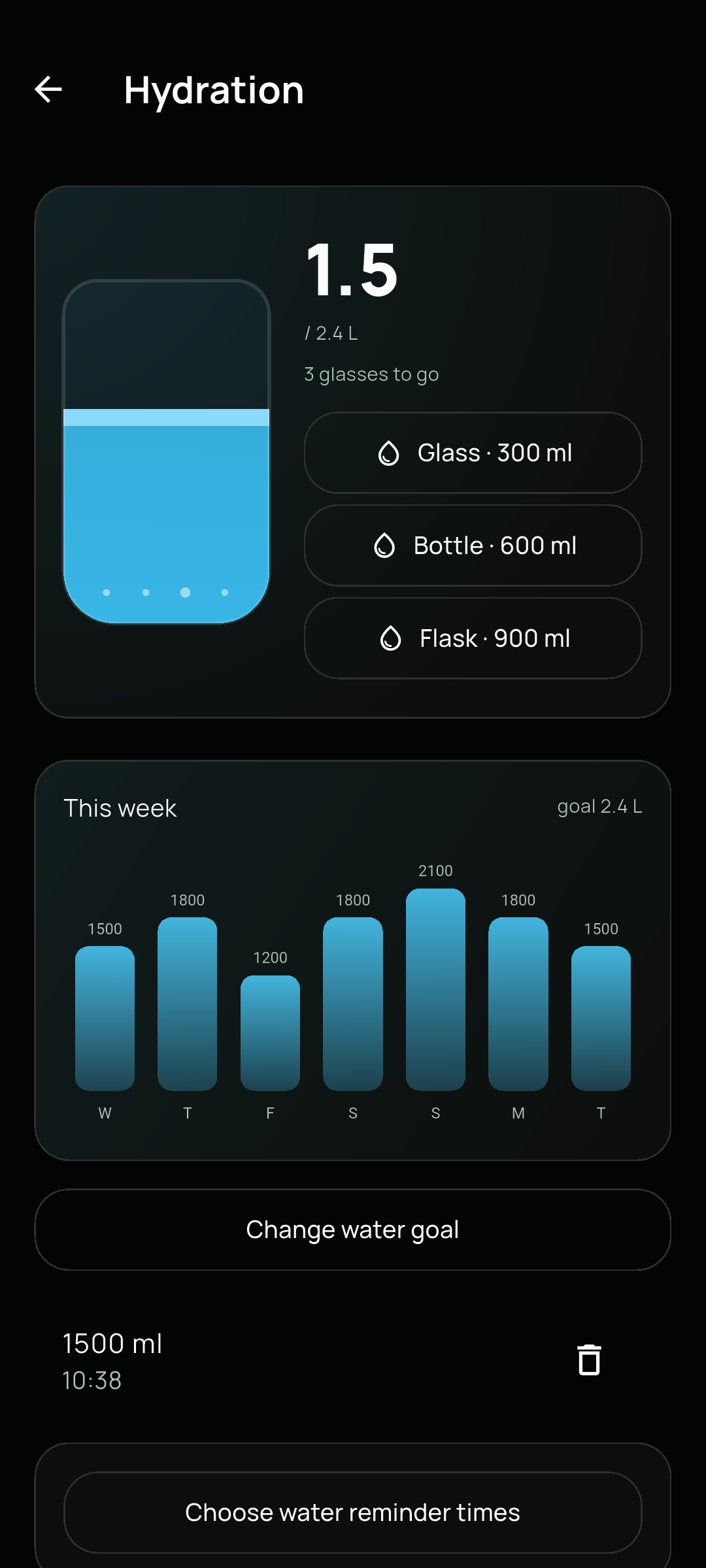
Open Hydration from Profile or the water card on Home. The illustrated glass shows your progress toward your daily goal. Quick-add actions record 300 ml, 600 ml or 900 ml, and the weekly chart shows your logged intake.
- 01Tap Glass, Bottle or Flask to add the corresponding amount.
- 02Use Change water goal to set your own daily amount.
- 03Review the entries below the chart and remove an entry if it was added by mistake.
02
Reminders on your schedule.
Choose water reminder times from the hydration screen. Notifications are optional, follow the device’s timezone and need your permission. Set times that fit your routine rather than working around a preset schedule.
- 01Open Choose water reminder times.
- 02Choose when you want a reminder and allow notifications if you want them.
- 03Return to these settings whenever your routine changes.
A few useful details.
Does Track choose how much water I should drink?
You choose your own daily water goal. Track records what you log and shows progress toward that amount; it does not prescribe a personal hydration requirement.
Can I track water without notifications?
Yes. Water logging and the weekly chart work without enabling reminders.